
Character Turnaround Generator for Consistent Front, Side and Back Views
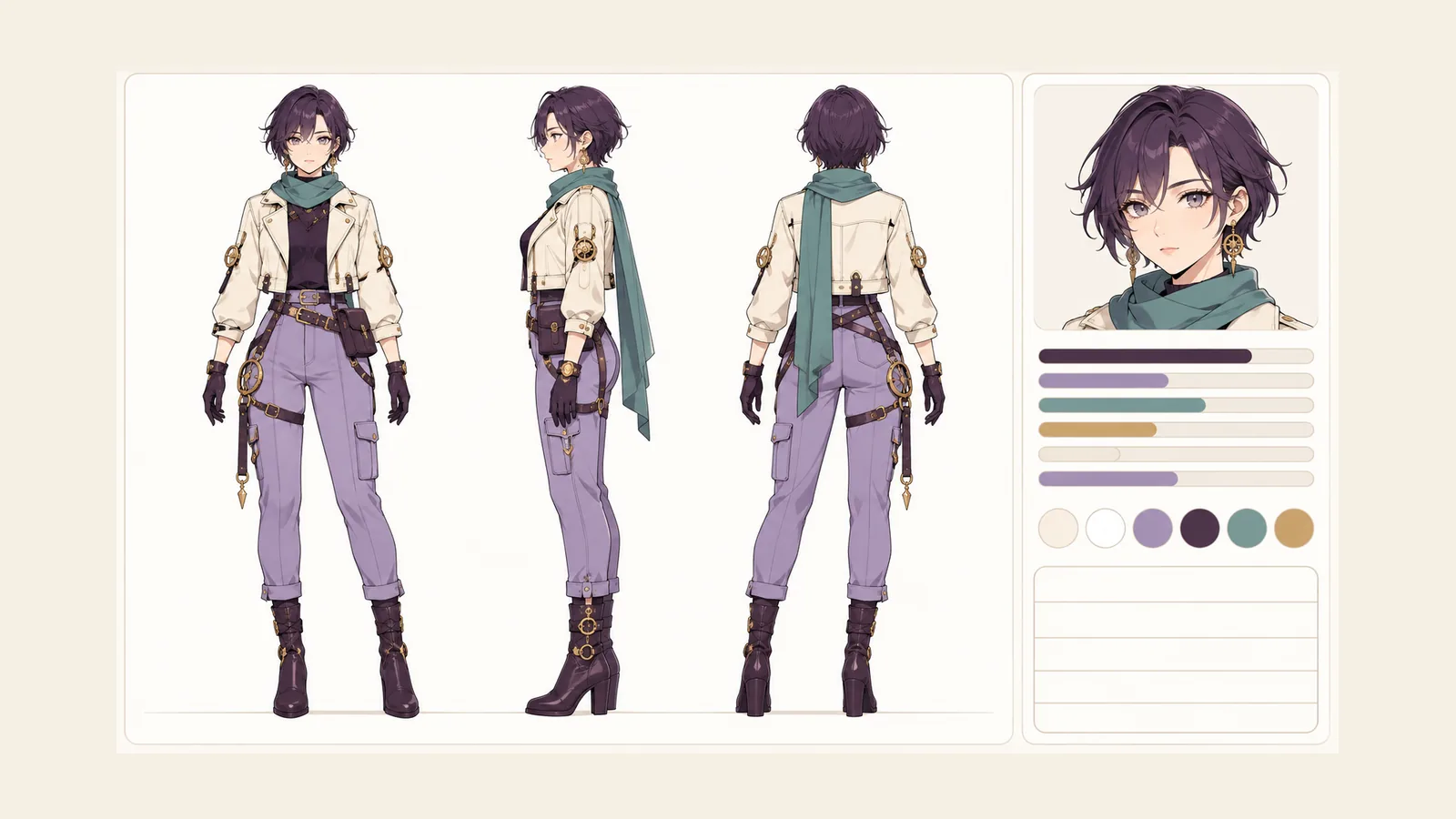
A character turnaround generator shows one character from the front, the side and the back on the same clean white sheet, so the design reads clearly from every direction. Describe the look once, and the views come back with matching hair, outfit and palette, ready to hand to an illustrator, a 3D modeler or a costume maker. A profile card sits beside the views with the character's name, age, origin, weapon, flaw, six stats and backstory, so the reference carries context as well as shape.
Try an example
PNG, JPG or WebP · up to 5 MB · 1 credit per image
Generate three full-body views of one character using your current options.
Sora Yamazaki
Whenever Sora Yamazaki visits an animal shelter, they spends extra time sitting quietly beside the older dogs who get overlooked.
Whenever Sora Yamazaki encounters an automatic sliding door that hesitates, they waves their hands frantically like a wizard.
Once a humble messenger running trails through a sheltered mangrove bay, Sora Yamazaki learned to fend off wilderness predators using a durable double-edged broadsword with engraved fuller. Their biggest challenge is that they cannot refuse a challenge to their personal honor, causing delays on time-sensitive deliveries. They now accept hazardous escort missions to fund their dream of opening an independent courier guild. They always folds paper receipts into miniature jumping frogs.
My works
How to create your character
Spell Out the Details Seen From Behind
Front-facing details are easy to remember, so think about the back too: a long braid, a cape clasp, bag straps, a tail, a pattern across a jacket. Add those to the design so the turnaround has something specific to show.
Generate the Three-View Sheet
Run the character turnaround generator and receive front, side and back full-body views on white, with the profile card beside them.
Send the PNG to Your Artist or Modeler
Download the PNG and attach it to a commission brief, or import it into your modeling project as a reference image. When you ask for changes, point to a specific view so everyone is looking at the same detail.
Character examples
Frequently asked questions
What a Character Turnaround Generator Gives an Artist
Commission threads stall on one question: what does the back look like? A turnaround answers it before it is asked. With front, side and back full-body views on a plain white background, an illustrator can see the outline of the hair from the side, the way a jacket hangs behind, and where straps and fasteners sit. That means fewer messages back and forth and a first sketch that lands close to what you imagined. Artists also like the white background because it keeps the design separate from any scene, so they can place the character in a new pose or setting without peeling away backdrop details. Attach the sheet with your request and mention which view matters most for the pose you want.
Keeping One Character Consistent Across Three Views
Consistency is the whole point of a turnaround, and a character turnaround generator earns its keep when all three views agree. The front, side and back come from the same generation, so hair length, outfit, accessories and color blocks are planned together instead of matched afterward. When you review a sheet, check three markers: the hair silhouette, the position of any accessory, and the main colors on the clothes. If they line up, the sheet is ready to hand off. If one detail drifts, describe it more precisely, for example by naming the exact side a pouch hangs on, and generate again. Small checks like these take a minute and spare your artist a round of questions, and the finished sheet gives every collaborator the same picture to work from.
Turnaround Reference for 3D Modeling
Modelers often start by loading a front view and a side view into the viewport and building the base mesh against them. A turnaround sheet fits that routine. Line the front and side images up at the same height, check that shoulders, waist and feet land on matching guide lines, then block out the proportions before refining details. The back view helps with the parts that are easy to forget, like the shape of a hood, the length of a coat in the rear or the placement of a belt buckle versus a back pouch. Treat the views from a character turnaround generator as a strong starting reference for proportions and costume layout, and let your modeler adjust measurements as the model comes together.
Turnarounds for Cosplay, Miniatures and Comics
A three-view sheet is useful well beyond illustration. Costume makers can plan patterns and trims from every side before buying fabric. Miniature painters can decide where each color goes, including the back of a cloak that nobody sees until the figure turns around. Comic artists can pin the sheet above the desk and keep outfits and hairstyles steady from panel to panel. Game designers can use it to brief a sprite or concept artist on a new character, and game masters can print one for each major villain so the whole table recognizes them from behind as well as from the front. And because a profile card comes with the views, collaborators learn the weapon, the flaw and the backstory without a separate document. For anyone building a character design portfolio, a clean turnaround is also a tidy way to present a finished design.